Showing posts with label iOS. Show all posts
Mailbox Treats Your Email Like A To-Do List, Is An Excellent Alternative To iOS Mail [Review]
Mailbox is here to fill the big, wide void left by Google-acquired Sparrow third party mail app for iOS. It takes the best features of the built-in Mail app, Gmail 2.0 and to-do list apps like Reminders, Any.DO to create a truly magical app for managing email on the go. Check out our full review after the jump.
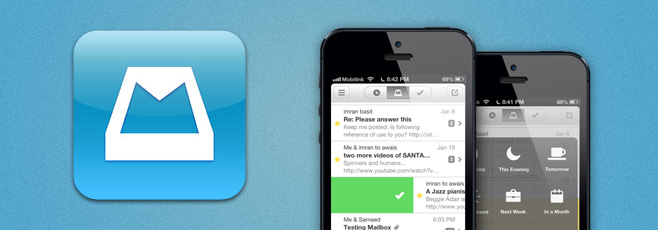
The app comes from the folks behind the award-winning “Orchestra” task management app – Orchestra, Inc. The startup looked at how people were using their task management app and found that users were regularly sending emails to themselves that served as reminders for tasks, and – as in my case – leaving low priority email messages as “unread” to come back to them later.
Mailbox has been developed with the aforementioned situations in mind. It treats each email message in your inbox like a task in a to-do list. If an email is super important, you can quickly reply to it right away like you would in any other traditional email app, or if you do not wish to deal with it at the moment, you can quickly “snooze” it to later today, evening, tomorrow, the weekend, next week / month or to a specific date. These snoozed messages are then placed in a separate list that you can access later, allowing quick management of your inbox. You are reminded to check snoozed messages at a later time.

Mailbox is here to fill the big, wide void left by Google-acquired Sparrow third party mail app for iOS. It takes the best features of the ...
Bitcasa Sheds Beta Tag; Comes To iOS With Automatic Camera Uploads
Despite being in beta for the past few months, Bitcasa has already gained considerable popularity. Infinite cloud storage might be nothing more than an illusion, but this service comes closest to making it a reality. Bitcasa gives its users 10GB of free cloud storage, with two ways of expanding this limit. You can subscribe to an unlimited package for $10/month, or get 1GB of free space for each new user you bring to Bitcasa. Apps for the service have already been around for Windows and Android, and now its iOS app has made its way to the App Store as well. The app lets you access your Bitcasa content and view a variety of file types on your iPhone. There is also an automatic upload feature similar to the one offered by Dropbox and Google+ on Android, which allows you to connect your camera roll with Bitcasa so that your photos and videos are always kept backed up on the cloud. As before, all data you upload to the cloud service is kept secure using encryption.
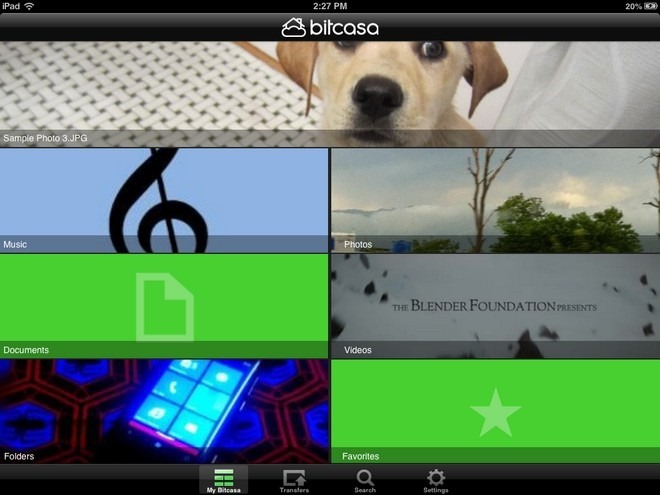
New users can sign up for a new Bitcasa account right from the app. You can register using Facebook, Twitter or an email address. Once you have registered or logged in, Bitcasa asks you to connect your iPhone’s camera roll with the app. You can skip this. but the feature is useful for unobtrusive photo uploads without having to worry much about storage space.
The ‘My Bitcasa’ page of the app has quite a unique interface, with separate tiles for different file types. There are sections for music, videos, photos, documents and folders. The cover image of each tile changes depending upon your usage. The big tile at the top of the screen shows a preview of the file you viewed most recently.
Bitcasa has built-in viewers/players for PDF files, office documents, photos, videos and songs. All file links can be further shared using email, SMS, Twitter and Facebook. You can also copy the URL and paste it anywhere you want. To save a file for offline viewing, long-press on its name and add it to your favorites.
Despite being in beta for the past few months, Bitcasa has already gained considerable popularity. Infinite cloud storage might be nothing m...
How To Run Any App In Full-Screen Mode On iPhone 5 & iPod touch 5G
It was bad enough when iPad owners had to wait for app updates just to get rid of the letterboxed view, but with the release of iPhone 5 and the latest iPod touch, the issue now affects a much larger number of people. It’s such a shame that many iOS apps do not take advantage of the full four inches available on the screen of the latest iPhone and iPod touch. Admittedly, most of the popular apps are now optimized for all screen resolutions, but if some of the lesser known ones are on your iPhone, things might get a bit annoying. If you have ever owned a jailbroken iPad, you might be familiar with at least one solution for the letterboxing problem. The Cydia tweak FullForce allows users to run any app in full screen on the iPad, even if it is only optimized for the iPhone. With iOS 6 finally getting jailbroken this week, there are already similar solutions available for iPhone 5 and iPod touch 5G. Let’s take a look at a couple of them.

FullForce For IPhone
Released by Ryan Petrich (the developer behind FullForce for iPad), this tweak lets you run a lot of legacy apps in full screen mode on any iDevice with a 4-inch screen. No configuration is required, and you can associate apps with FullForce for iPhone on the fly. There is a menu in the Settings app that lets you manually change permissions, but the better way of handling things is to simply launch a non-optimized app and hit the ‘Apply’ button when the tweak asks for your permission to use ‘tall mode’. The end results are pretty good, and you usually wouldn’t be able to tell the difference between an officially optimized app and one using FullForce. Having said that, the tweak does not work with all apps, with games being specially troublesome. The developer has mentioned this issue in the tweak’s official description as well, and has promised to keep expanding the compatibility list.
FullForce can be downloaded for $0.99 from the BigBoss repo of Cydia store.
Screen Extender
On the surface, Screen Extender might not look much different from FullForce for iPhone, but this tweak is a bit harder to use. Unlike FullForce, Screen Extender has to be configured manually. You are required to pick legacy apps from a lengthy list containing stock apps, third-party apps and even some hidden system applications. After every change in settings, you have to respring the device manually. Even then, some of the apps continue showing up with dark bands at the top of the screen. Another complaint about Screen Extender is that in some apps, the extended area becomes unresponsive. All of these shortcomings do come with a positive side though – Screen Extender is available as a free download, while FullForce is a paid tweak. You can grab Screen Extender from the BigBoss repo of the Cydia store.
It was bad enough when iPad owners had to wait for app updates just to get rid of the letterboxed view, but with the release of iPhone 5 and...
Subscribe to:
Posts (Atom)

My Blog List


Copyright 2013 (c) eNews